

Lecture notes template in Markdown
Lecture notes are read twice: by students during the course, and again before the exam. They need learning goals up front, definitions you can find again, worked examples and exercises at the end. This template has all of it, set in the Lecture notes theme with numbered sections and a title block with the course, lecturer and date.
Below is a short lecture written with it. Edit the Markdown and the preview follows.
# Lecture 3: Mean and variance

# Learning goals {.unnumbered}

After this lecture you can:

- compute the mean and variance of a data set;
- explain why the variance is squared;
- decide when the median is the better summary.

# The mean

Mean
: The **mean** of $n$ values is their sum divided by $n$.

> [!TIP]
> Intuition: the mean is the point where a ruler with weights on it balances.

**Example 3.1.** The values 2, 4 and 9 have the mean

$$
\bar{x} = \frac{2 + 4 + 9}{3} = 5.
$$

# The variance

> [!IMPORTANT]
> **Theorem 3.2.** The variance is the mean of the squared deviations from the mean: $s^2 = \frac{1}{n}\sum_i (x_i - \bar{x})^2$.

> [!WARNING]
> Dividing by $n - 1$ instead of $n$ gives the sample variance. Check which one your formula sheet uses.

# Exercises

1. Compute the variance of 2, 4 and 9.
2. Two data sets have the same mean. Can their variances differ?
3. ★ Show that adding a constant to every value does not change the variance.
After this lecture you can:
- compute the mean and variance of a data set;
- explain why the variance is squared;
- decide when the median is the better summary.
- Mean
- The mean of values is their sum divided by .
Tip
Intuition: the mean is the point where a ruler with weights on it balances.
Example 3.1. The values 2, 4 and 9 have the mean
Important
Theorem 3.2. The variance is the mean of the squared deviations from the mean: .
Warning
Dividing by instead of gives the sample variance. Check which one your formula sheet uses.
- Compute the variance of 2, 4 and 9.
- Two data sets have the same mean. Can their variances differ?
- ★ Show that adding a constant to every value does not change the variance.
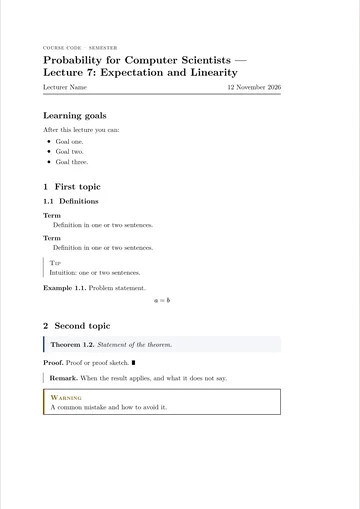
What's in it
- Title block. Course and semester as subtitle, the lecture title, the lecturer and the date.
- Learning goals. Three to five goals, each starting with a verb students can check themselves against.
- Topics with definitions. A definition list for terms, a tip box for the intuition, and a worked example numbered by lecture (3.1, 3.2) so students can cite it.
- The main result. A theorem in an alert box, a proof, a remark on when it applies and a warning about the common mistake.
- Summary and exercises. Exercises from routine to hard (mark hard ones with a star), with parts (a), (b), (c) as a nested list, then further reading.
The grey notes under each heading are Markdown comments: they show in the editor and to the AI assistant, never in the PDF.
What Markdown gives you here
- Math in LaTeX syntax, inline with
$...$and displayed with$$...$$, rendered with KaTeX in the preview and the PDF. - Alert boxes (
> [!TIP],> [!IMPORTANT],> [!WARNING],> [!NOTE]) for intuition, theorems and pitfalls. - Diagrams with Mermaid, and code blocks with syntax highlighting for programming courses.
- Numbered sections from the theme, so you never type numbers that go stale when you move a section.
Reuse it every week
Duplicate last week's lecture (File › Duplicate, with an account) to keep the title block and structure. Students can open the link read-only, or you publish the notes as a web page: a snapshot at its own address that anyone can read without an account. Publishing is included in every plan.
What it doesn't do
The exercises are text: markoto has no quiz or answer-checking feature, and no slide mode. See markoto for teachers for what it does offer.
Questions
Can I write math in the notes?
Can students read the notes without an account?
Can I number theorems and examples automatically?
Can I print the notes as a handout?
Updated November 19, 2026