

On-call runbook template in Markdown
A runbook is read at three in the morning by someone who didn't write it. This template is built for that reader: severity levels first, then one procedure per alert named as the pager names it, with the commands in code blocks, then escalation contacts and a quick reference of dashboards and commands.
Below is a short runbook for a made-up service. The theme numbers the sections, so "see 3.1" works on a call.
# Checkout service runbook

# How to use this runbook

For the engineer on call for the checkout service. Find the alert that paged you under Procedures and follow the steps in order.

> [!IMPORTANT]
> If customers are affected and you have not found the cause within 15 minutes, declare an incident and page the incident commander.

# Severity levels

| Level | Definition | Response |
|---|---|---|
| SEV-1 | Customers cannot pay | Page the incident commander |
| SEV-2 | Payments slow or partly failing | Fix within the hour |

# Procedures

## CheckoutErrorRateHigh

**Alert:** More than 2% of checkout requests fail for 5 minutes.

1. Check the dashboard for the failing component.
2. Look at the most recent deployment:
   ```bash
   kubectl rollout history deployment/checkout
   ```
3. If the deployment is the cause, roll it back.
4. Confirm the alert clears within a few minutes. If not, escalate.

> [!WARNING]
> Do not restart the payment workers while orders are in flight.

# Escalation

| Area | First contact | Hours |
|---|---|---|
| Incident commander | On-call manager | 24/7 |
| Payments | Payments team lead | 08:00-18:00 |
For the engineer on call for the checkout service. Find the alert that paged you under Procedures and follow the steps in order.
Important
If customers are affected and you have not found the cause within 15 minutes, declare an incident and page the incident commander.
| Level | Definition | Response |
|---|---|---|
| SEV-1 | Customers cannot pay | Page the incident commander |
| SEV-2 | Payments slow or partly failing | Fix within the hour |
Alert: More than 2% of checkout requests fail for 5 minutes.
- Check the dashboard for the failing component.
- Look at the most recent deployment:
kubectl rollout history deployment/checkout - If the deployment is the cause, roll it back.
- Confirm the alert clears within a few minutes. If not, escalate.
Warning
Do not restart the payment workers while orders are in flight.
| Area | First contact | Hours |
|---|---|---|
| Incident commander | On-call manager | 24/7 |
| Payments | Payments team lead | 08:00-18:00 |
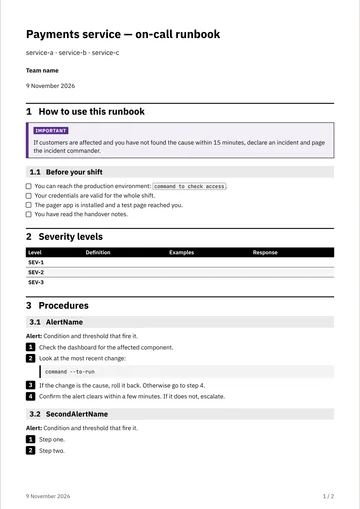
What's in it
- Title block. The title, the services covered, the owning team and the date. The date is on every page, because printouts go stale.
- How to use this runbook. Who it is for and how a procedure is laid out, with a warning box on when to declare an incident.
- Before your shift. A checklist for the handover: access works, credentials are valid, the pager reaches you.
- Severity levels. One row per level with the definition in customer terms, an example and the response.
- Procedures. One section per alert, named exactly as the alert is named in the pager, with the alert condition, numbered steps, commands in code blocks and warning boxes where a step can make things worse.
- Escalation, after the incident and quick reference. Who to call, what to do before the incident is closed, and tables of dashboards and commands.
The briefs under the headings are Markdown comments: visible in the editor and to the AI assistant, never on the page or in the PDF.
Why it works for a runbook
- Section numbers from the theme. Sections are numbered by the theme, so you refer to "section 3.2" on a call, and the numbers stay right when you move a section.
- Code blocks with syntax highlighting, for commands people copy.
- Task lists that readers tick off in the preview.
- A PDF for the pager. Export a paged PDF with the title and date on every page, and print it or attach it to the on-call handover.
- Several owners. Each team edits its own procedures in the same document. The activity log shows who changed a step and when, and an earlier state can be restored.
Questions
Are the sections numbered?
Can I put commands in the runbook?
Does it connect to our pager or monitoring?
Can several teams edit one runbook?
Updated November 19, 2026